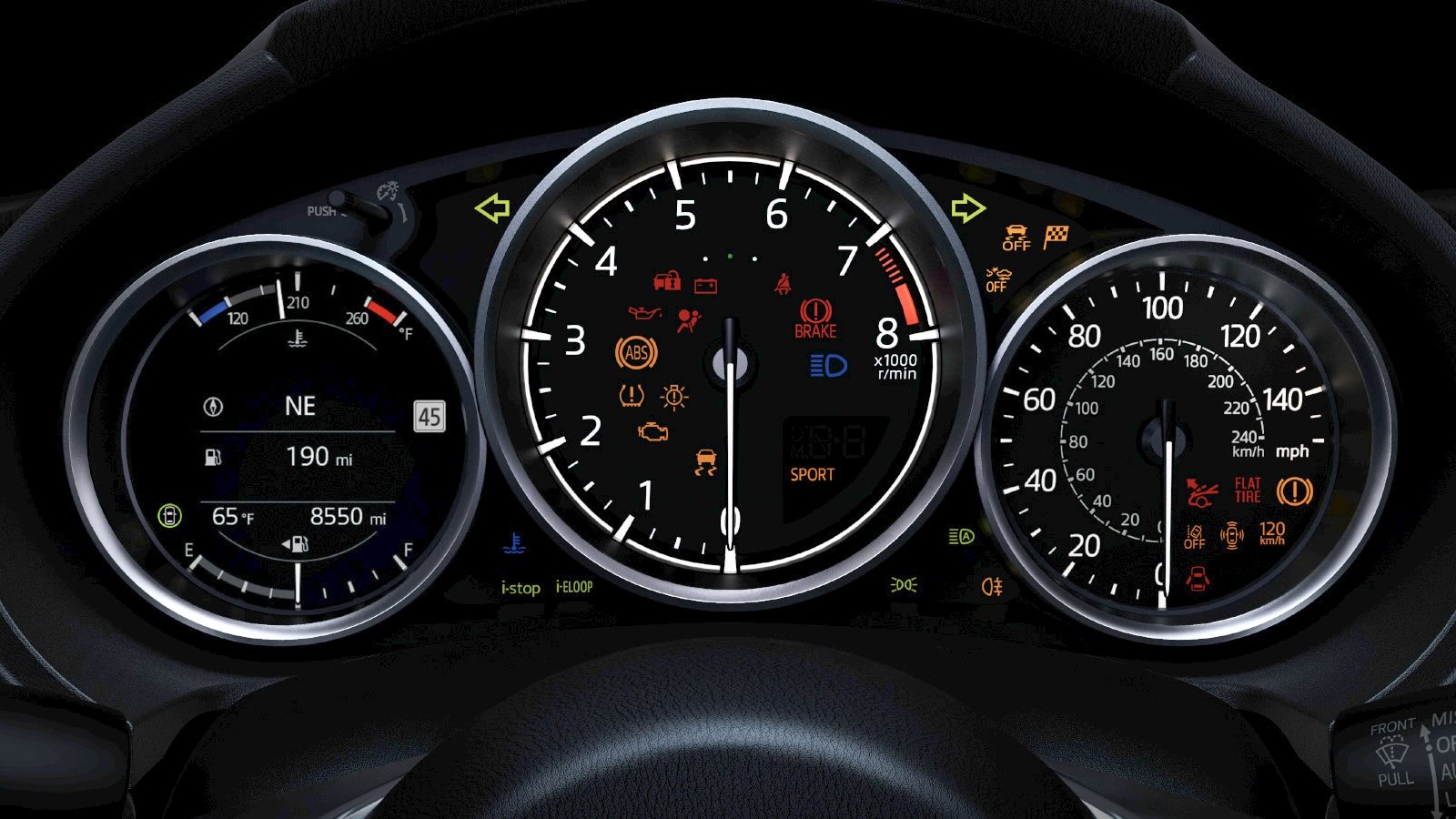
The wrench light on many Mazda models is a maintenance reminder, rather than the check engine light. It generally means a scheduled service or engine oil replacement is due. If the wrench is the only indicator, the vehicle runs normally and no urgent warning message appears, arrange the maintenance indicated by your owner’s manual promptly. The wrench alone does not confirm that the vehicle is safe to drive.
About this guide: This overview covers common Mazda maintenance reminders and dashboard warnings. Symbols, service intervals and reset procedures vary by model, year, engine and equipment. Follow the instructions in your vehicle’s U.S. owner’s manual and any message displayed in the vehicle.
What does the wrench light mean on a Mazda?
The wrench typically indicates that scheduled maintenance or an oil change is due. Depending on the vehicle, the maintenance monitor may display a wrench, a maintenance message or both.
For example, the 2025 Mazda3 U.S. maintenance schedule says the maintenance indication appears before the maximum interval of 10,000 miles or 12 months after the previous maintenance. This is a model-specific maximum, not a recommended interval for every Mazda or every driving situation. Service is required when the maintenance indication appears, even if that happens earlier.
The engine-shaped check engine light is different. It can indicate a fault involving the engine, emissions controls or related systems. Do not treat an engine warning or another urgent message as a routine maintenance reminder.
What can cause the wrench light to come on?
Depending on the vehicle’s maintenance-monitor settings, common explanations include:
- A scheduled maintenance interval has been reached. The reminder may track time, distance or both.
- An oil change is due. On vehicles with a flexible oil-change setting, operating conditions can affect when the reminder appears.
- The reminder was set to a shorter interval. Check the maintenance settings and the applicable service schedule.
- The monitor was not reset after maintenance. Confirm what work was completed before resetting the reminder.
Driving conditions also matter. The 2025 Mazda3 U.S. schedule specifies oil and filter replacement every 5,000 miles or 6 months, whichever comes first, for the severe conditions listed in that manual, including prolonged idling or low-speed operation and driving mainly on unpaved or mountain roads. Frequent low-speed Miami traffic may fit those conditions. Other models and years can have different requirements, so use your own vehicle’s schedule.
Can low oil cause the wrench light?
Do not use the wrench as an oil-level or oil-pressure check. On many U.S. gasoline Mazda models, it is a maintenance reminder. Oil-level and oil-pressure warnings, where fitted, are separate indicators. Diesel models and other powertrains can have different wrench-indicator functions.
The 2026 CX-50 manual’s engine oil level warning section states that the warning indicates oil around the MIN mark and warns against continuing to drive with the light on. Follow the manual’s oil-checking and replenishment instructions.
An oil-pressure warning requires a different response: stop safely and switch off the engine. Continuing to run an engine with insufficient oil pressure can cause serious damage. Not every Mazda has a separate oil-level warning, and the absence of a warning does not establish that the oil level is correct.
How do you reset the Mazda wrench light?
Complete the required maintenance first, then reset the applicable monitor using the procedure for your vehicle. Resetting the reminder does not perform the service or repair a fault.
On some newer Mazda Connect systems, the menu path is:
- Park safely, apply the parking brake and switch the ignition on as directed by your manual.
- Select Information on the Mazda Connect home screen.
- Select Vehicle Status Monitor, then Vehicle Maintenance Settings.
- Select the applicable reset option, such as Reset Oil Change Distance or Reset Service Interval, after the corresponding work has been completed.
These menu names are examples, not a universal procedure. Older Mazda Connect systems may use Applications → Vehicle Status Monitor → Maintenance, with separate Scheduled and Oil Change settings. Follow the instructions for your model and reset each applicable maintenance item.
The 2018 CX-5 manual also describes a dashboard illumination knob procedure for the applicable Type A maintenance monitor: with the ignition off, hold the knob, switch the ignition on and continue holding it for more than five seconds. The master warning light flashes when the reset is complete. Use this method only if your manual specifies it for your vehicle.
Before resetting: Check the service record. If maintenance was recently performed, confirm that the correct work was completed and the appropriate monitor was reset. If service is still due, arrange it rather than clearing the reminder.
What does a yellow Mazda dashboard light mean?
Yellow or amber often indicates a condition that needs attention, but color alone does not determine whether you can continue driving. Read the symbol and accompanying message, then follow the warning-specific instructions in your owner’s manual. Some amber warnings require urgent action.
| Light | Possible meaning | What to do |
|---|---|---|
| Wrench | Scheduled maintenance or oil replacement is due on many models. | Read the maintenance message and arrange the required service promptly. Check for other warnings. |
| Check engine | An engine, emissions-control or related fault may have been detected. | Arrange prompt inspection. If flashing, avoid high speeds and heavy acceleration, stop safely and seek immediate advice. Arrange towing if the engine shakes, loses power or other urgent warnings appear. |
| Engine oil pressure | Engine oil pressure may be insufficient. | Stop safely and switch off the engine. Follow the manual. Do not resume driving if the warning persists; arrange assistance. |
| Engine oil level, where fitted | The oil level may be too low. | Stop safely. Check and replenish oil according to the manual before continuing. Seek assistance if the warning persists. |
| High coolant temperature | The engine may be overheating. | Stop safely and follow the manual’s overheating procedure. Never remove a coolant-system cap while the engine is hot. |
| Brake system | Depending on the model, the parking brake is applied, brake fluid is low or a brake-system fault is present. | If it remains on after the parking brake is fully released, or braking feels abnormal, stop safely and arrange assistance. |
| Charging system | A charging-system fault may be present. | Stop safely and arrange assistance. The vehicle may lose electrical power or stop running. |
| ABS | Anti-lock braking may be unavailable. | Arrange prompt inspection and follow the manual. If ABS and brake-system warnings appear together, do not continue driving. |
| Tire pressure (TPMS) | Low tire pressure or a TPMS fault, depending on the light’s behavior. | Reduce speed, avoid sudden maneuvers and stop safely to inspect the tires. Do not drive on a flat or damaged tire. Use the door-jamb placard for specified pressure. |
| Master warning triangle | An accompanying message requires attention. | Read the message. The underlying warning determines the required action. |
| i-stop, where equipped | Green generally indicates normal operation. Amber can indicate that the system is disabled or needs attention, depending on the model and light behavior. | Check the manual and displayed message. Have persistent or flashing warnings inspected; do not assume the battery is the sole cause. |
This table is a summary of common indicators, not a complete list or a substitute for model-specific instructions. Hybrid, plug-in hybrid and other powertrains may have additional warnings.
The i-stop light and master warning triangle
On equipped models, i-stop can stop the engine automatically while the vehicle is stationary and restart it when required. A green indicator can be part of normal operation. An amber indicator or flashing warning needs to be interpreted using the manual for that specific vehicle.
Battery condition, temperature, electrical demand and other operating conditions can affect whether i-stop operates. A warning light alone is not enough to diagnose a battery problem.
The triangle with an exclamation point is a master warning indicator. Read the accompanying message in the instrument cluster or center display. The message, rather than the triangle alone, tells you what needs attention and whether to stop.
Multiple warnings on a CX-90 or CX-70?
Follow any urgent displayed instructions first. Then check your VIN for outstanding recalls.
Mazda safety recall 7124J concerns certain 2024–2025 CX-90 and 2025 CX-70 vehicles. Mazda describes a software error that can occur during startup, display multiple warning messages and affect several vehicle functions. Multiple warnings do not, by themselves, establish that this recall is the cause.
Check your vehicle at NHTSA.gov/recalls or Mazda’s recall lookup. An authorized Mazda dealer can confirm whether an outstanding recall applies and explain the remedy.
Which Mazda warning lights require you to stop?
A maintenance reminder alone generally calls for service rather than an emergency stop. Other warnings require a different response, even if the vehicle still feels normal.
Stop safely and seek assistance for:
- An oil-pressure warning: switch off the engine.
- A high coolant-temperature warning: follow the manual’s overheating procedure.
- A brake-system warning that remains after the parking brake is released, or abnormal braking.
- ABS and brake-system warnings appearing together.
- A charging-system warning while the engine is running.
- A flashing check engine light, especially with shaking, loss of power or other urgent warnings.
- Any message instructing you to stop, or a flat or visibly damaged tire.
Do not rely on light color alone. If you cannot identify the warning or are unsure whether the vehicle can be driven, stop in a safe location and contact roadside assistance or a service professional.
More questions Mazda owners ask
Why do several warning lights come on when I start my Mazda?
Many indicators illuminate briefly when the ignition is switched on as part of a system check. Some go out after a few seconds; others go out after the engine starts or a condition changes, such as releasing the parking brake. Check your manual if a warning remains on unexpectedly or an indicator fails to behave as described.
Will an oil change automatically turn off the wrench light?
Not necessarily. The maintenance monitor generally needs to be reset using the applicable procedure. If the oil was changed but the wrench remains on, confirm that the correct monitor was reset and that another scheduled maintenance item is not still due.
Is the wrench light the same as “Service Due Soon”?
A wrench and a maintenance-related message may come from the same maintenance-monitor system. Wording varies by model and year. Read the complete message: not every message containing the word “service” is a routine maintenance reminder.
Can I reset the wrench light myself?
On many models, yes, using the procedure in the owner’s manual. Complete or confirm the required maintenance first. If the reminder returns unexpectedly or another warning remains, arrange an inspection.
Schedule Mazda service in Miami
If your wrench reminder is on, schedule the maintenance indicated by your vehicle’s monitor and manual. If an urgent warning is displayed, seek advice before driving to the dealership.
Sources and scope
This educational guide references Mazda’s U.S. owner’s manuals and Mazda’s published recall information. Service requirements and warning responses depend on the specific vehicle. Follow your owner’s manual, displayed instructions and professional inspection findings.
Published September 30, 2026. Last updated September 30, 2026.